SLURM Introduction
An application needs a resource allocation before it can run on compute nodes. ICARUS uses the Slurm Workload Manager to allocate capacity, launch and monitor tasks, and queue competing requests. Submit jobs from a login node. See the Slurm Quick Start Guide.
Common Terms
| Term | Meaning |
|---|---|
| Node | A compute machine |
| Partition (queue) | A group of nodes with access and scheduling rules |
| Job | A user's resource allocation for a limited time |
| Job step | Tasks launched within an allocation |
SLURM Commands
| Command | Use |
|---|---|
sacct |
Review job accounting |
sbatch |
Submit a batch script |
scancel |
Cancel your job |
scontrol show |
Inspect jobs, nodes, or partitions |
sinfo |
Check nodes and partitions |
squeue |
List running and pending jobs |
srun |
Launch tasks or job steps |
Use man sbatch or sbatch --help for help, substituting another command as needed. Options are case-sensitive. Administrative changes through scontrol require appropriate permissions. These commands are described in the Slurm command overview.
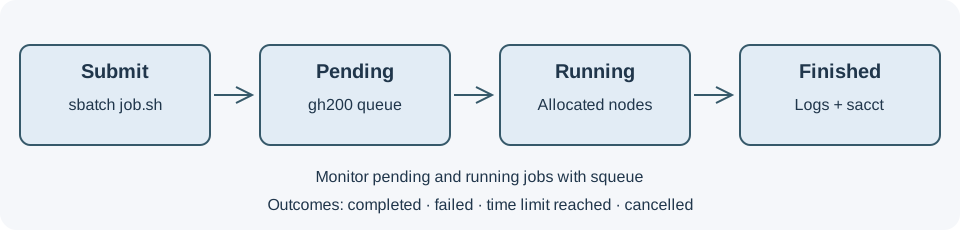
Submit, Run, and Review
Choose a job template, submit it, then monitor or cancel it. Review finished jobs with Job Accounting.